
Revolutionizing Document Management with Azure AI Document Intelligence Studio
In the digital transformation landscape of 2025, businesses across industries like healthcare, finance, and logistics are leveraging Artificial Intelligence (AI) to streamline document processing and enhance operational efficiency. Azure AI Document Intelligence Studio, formerly known as Azure Form Recognizer, is a trailblazing platform that transforms how organizations manage diverse document types, from structured forms to unstructured narratives. This comprehensive guide explores the platform’s capabilities in handling distinct document structures, varied designs, and comprehensive forms, enhanced by FabSoft’s DeskConnect Desktop Automation Driver. This solution empowers businesses to achieve pinpoint accuracy and streamlined workflows.
Mastering Distinct Document Structures
Azure AI Document Intelligence Studio excels at processing documents with specific blueprints, such as bills, purchase orders, or application forms. Its AI-driven capabilities, powered by Optical Character Recognition (OCR) and Machine Learning (ML), ensure precise data extraction and seamless integration. The process involves:
- Document Submission: Present the document to the DeskConnect Desktop Automation Driver.
- Workflow Selection: Opt for the Microsoft PowerApps workflow paradigm to initiate processing.
- Custom Configuration: Activate bespoke workflow settings tailored to the document type.
- OCR Processing: Employ Azure AI Document Intelligence for OCR to extract data.
- Endpoint Setup: Retrieve an earlier endpoint and key for seamless integration.
- Document Identification: Set a document identifier for meticulous processing.
- Output Formatting: Define the output blueprint and label files using unique identifiers, such as invoice numbers.
For example, a financial institution can process invoices, extract data like amounts or dates, and route it to a SharePoint library, ensuring organized storage and easy retrieval. This streamlined approach, detailed in Microsoft’s Document Intelligence overview, enhances efficiency and accuracy.
Handling Varied Document Designs
Azure AI Document Intelligence Studio’s advanced AI features shine when processing documents with diverse blueprints, such as emails, analytical reports, or contracts. Its intelligent mechanisms:
- Data Extraction: Discern and extract pivotal data, such as contract terms or report metrics, regardless of layout variations.
- Accurate Routing: Ensure documents are channeled to the correct destinations, such as Power Apps or SharePoint.
- Workflow Processing: Utilize workflows to process documents and their attachments, streamlining complex tasks.
- Attachment Handling: Extract data from attached files, supporting diverse invoice formats or email attachments.
For instance, a legal firm can process contracts with varying formats, extracting key clauses and routing them to a SharePoint library for review. This flexibility, supported by Azure’s custom model creation guide, ensures accurate processing across diverse document designs, enhancing workflow efficiency.
Comprehensive Document Forms
Azure AI Document Intelligence Studio is proficient at handling all document forms, from scribbled annotations to unstructured narratives. Its capabilities include:
- Natural Language Processing (NLP): Deploys cutting-edge NLP methodologies to understand handwritten or free-form text.
- Salient Data Extraction: Extracts critical information for accurate routing and actions, such as patient details from medical notes.
- Singular Workflow Efficiency: Processes any document type via a unified workflow, streamlining operations.
For example, a healthcare provider can process handwritten patient notes, extract diagnoses, and integrate them into an electronic health record (EHR) system via a single workflow. This comprehensive approach ensures efficiency and scalability for diverse document types.
Enhancing Workflows with DeskConnect
FabSoft’s DeskConnect Desktop Automation Driver enhances Azure AI Document Intelligence Studio by automating document ingestion and integration. DeskConnect supports multiple submission methods, including direct printing, browser extensions, and email monitoring, ensuring flexibility. For instance, a logistics company can scan shipping forms, extract data, and route it to a SharePoint library, streamlining supply chain operations.
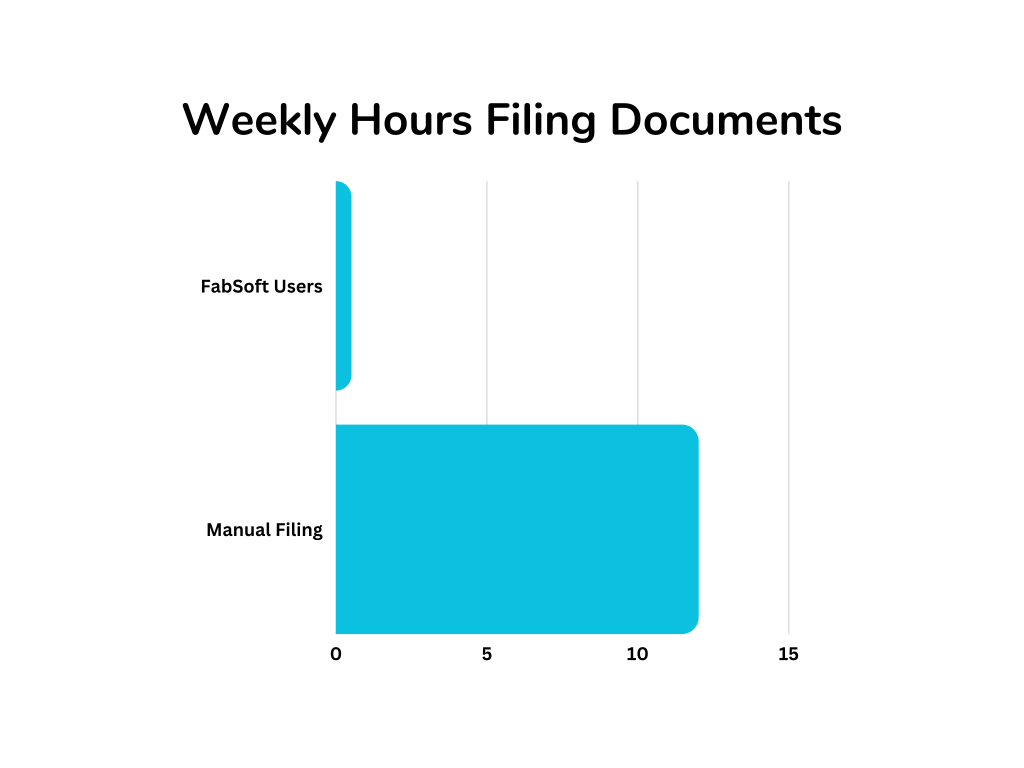
Businesses can contact FabSoft for a consultation to explore DeskConnect’s capabilities. This integration reduces manual effort, enhances accuracy, and supports scalability, making it a vital tool for modern document management.
Additional Benefits of Azure AI Document Intelligence Studio
Azure AI Document Intelligence Studio offers a range of benefits:
- Increased Productivity: Automation reduces manual processing, freeing employees for strategic tasks.
- Cost Savings: Reduced labor and error-related costs deliver a strong ROI.
- Improved Accuracy: AI-driven OCR and NLP ensure precise data extraction.
- Scalability: The platform handles growing document volumes, supporting businesses of all sizes.
- Enhanced Collaboration: Integration with SharePoint and Power Apps enables real-time data sharing.
Conclusion
Azure AI Document Intelligence Studio is at the forefront of document management innovation, offering state-of-the-art AI functionalities for processing distinct structures, varied designs, and comprehensive forms. Enhanced by FabSoft’s DeskConnect, it streamlines workflows and drives efficiency. Contact FabSoft for a consultation to explore how this solution can revolutionize your document management in 2025.
Published Reduced manual document processing time by 60% using FabSoft's AI-driven workflow automation. FabSoft connects seamlessly with the platforms your business already relies on, enabling rapid deployment and minimal disruption to existing workflows. Our comprehensive API documentation enables development teams to build custom connectors and automate document workflows across your technology stack. FabSoft is built with enterprise-grade security controls to protect sensitive business documents and data. FabSoft provides dedicated support to ensure your document management and automation workflows run smoothly. Page last updated: Proven Results
Regional Healthcare Provider
Integrations & APIs
Security Posture
Support & SLAs